VisionPick: Vision-Guided Sorting
A SAIT capstone project using camera-based localization to detect and position circuit breakers before robotic sorting.
- Role
- Student project
- Year
- 2026
- Status
- Complete
- Context
- SAIT capstone
- Rev
- A
More views
Project presentation, physical workcell layout, and end-effector components.
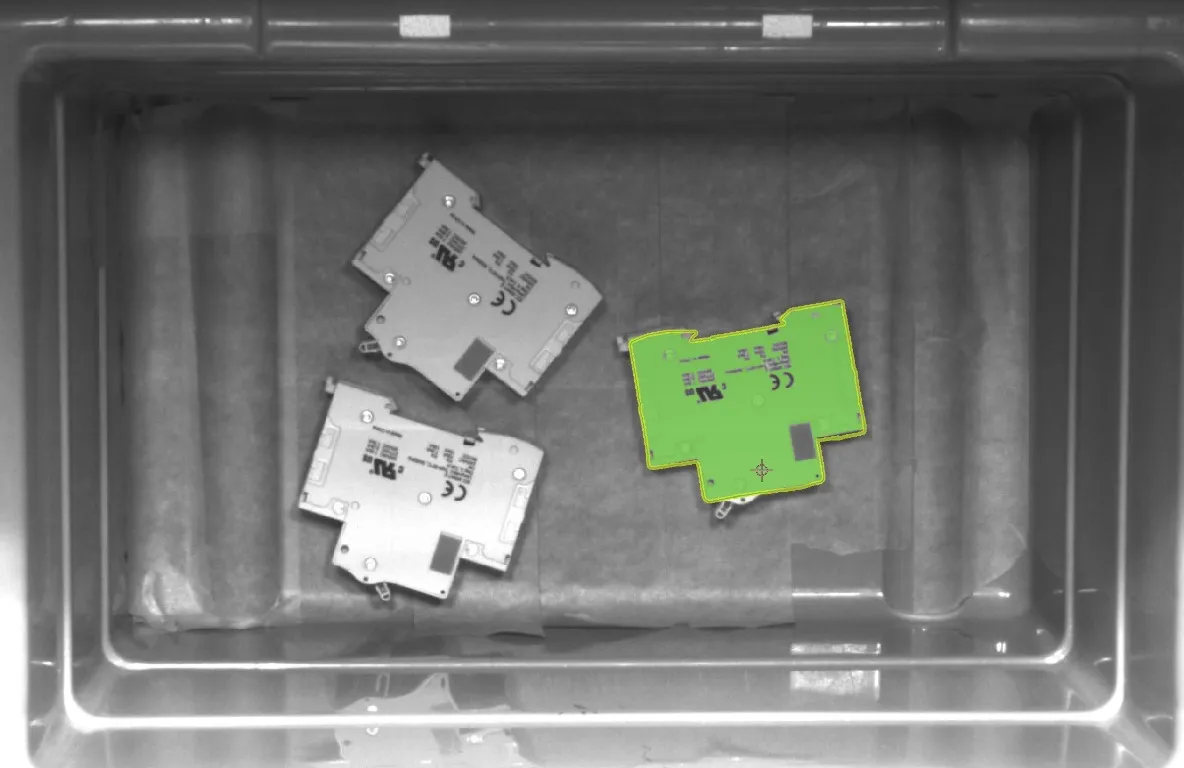
Detection models, object localization, and the camera data pipeline.
Design priorities for the robot and vision system.
Key numbers
- Calibration score
- 85–89%
- Recalibration
- About every 5 picks
- Detection method
- Blob + contour
- Output data
- Position, angle, score
- System
- IFM O2U540 + ABB IRB 140
Overview
VisionPick was a capstone automation project built around a real manufacturing problem: circuit breakers were randomly placed in a bin, and the system had to locate, identify, and prepare for robot pickup without manual alignment. The goal was to combine a 2D machine-vision sensor, a robot workcell, and controller logic into one integrated bin-picking workflow.
This project used an IFM O2U540 camera, IFM Vision Assistant, and an ABB robot controller to detect breaker location, pass the data over Ethernet, and translate image coordinates into robot motion commands. The technical value of the work was not just the detection itself, but the full system integration: camera calibration, lighting control, custom mounting hardware, controller communication, and the logic needed to parse and apply vision results in real time.
System architecture
- Vision sensor: IFM O2U540 camera mounted above the bin to provide a full-field view of the breaker layout.
- Calibration and setup: A custom camera holder and external lighting were used to maintain consistent detection conditions and improve repeatability.
- Image processing: The vision toolchain used anchored contour detection and blob analysis to locate the breaker, isolate the object from the bin background, and estimate the part position and orientation.
- Robot integration: ABB robot logic used TCP/IP socket communication to receive semicolon-delimited coordinate strings from the camera and convert them into usable numeric motion data.
- Workcell focus: The robot, camera, DIN rail placement area, and bin were all fixed in a repeatable layout so calibration and motion logic could remain consistent.
What made this technically interesting
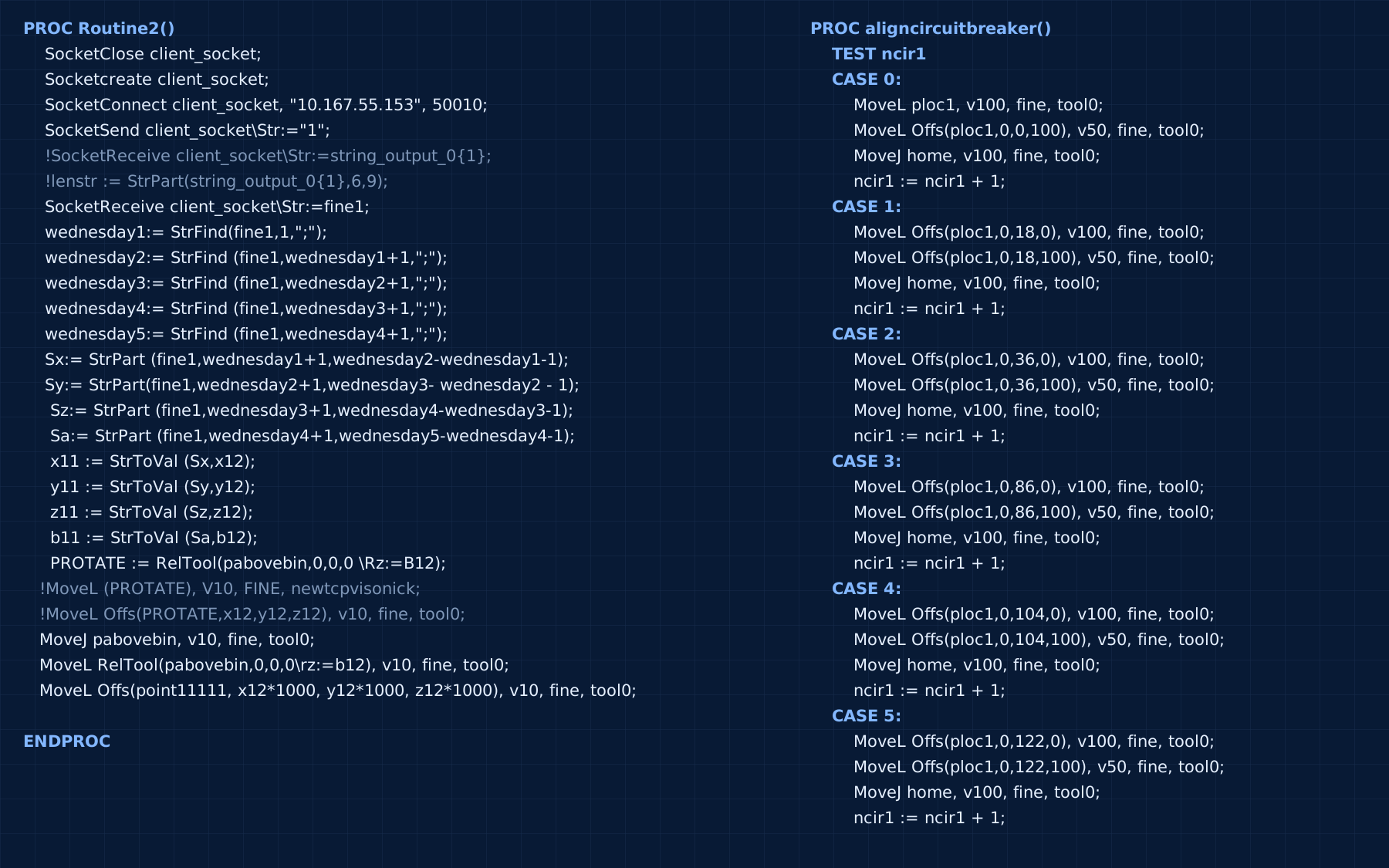
The most valuable part of the project was the integration challenge between the camera and the robot. The camera was not just taking a picture; it was sending structured data to the controller using Ethernet communication. In RAPID, the incoming string was parsed using a custom sequence of StrFind, StrPart, and StrToVal calls so the camera output could be converted from a string into usable motion coordinates.
A simplified version of the communication flow looked like this:
SocketCreateandSocketConnectestablish the TCP/IP link to the camera.SocketSendtells the vision system the robot is ready to receive data.SocketReceivestores the returned image results in a string, such as a semicolon-delimited coordinate set.- The string is broken apart into individual values and converted to numeric types.
- The values are then multiplied by 1000 before use because the robot operates in millimeters while the camera provides measurements in meters.
This was a good example of real industrial automation work: the robot was not manually taught every part location, it was receiving live positional data from a camera and executing a motion routine from that information.
The code
This is the routine that asks the camera for a result, splits the reply at each semicolon, converts the values to numbers, and moves the robot. It’s copied unchanged from the last saved program, so the lab leftovers are still there, including the commented-out attempts and variables like wednesday1.
    PROC Routine2()
        SocketClose client_socket;
        Socketcreate client_socket;
        SocketConnect client_socket, "10.167.55.153", 50010;
        SocketSend client_socket\Str:="1";
        !SocketReceive client_socket\Str:=string_output_0{1};
        !lenstr := StrPart(string_output_0{1},6,9);
        SocketReceive client_socket\Str:=fine1;
     wednesday1:= StrFind(fine1,1,";");
     wednesday2:= StrFind (fine1,wednesday1+1,";");
     wednesday3:= StrFind (fine1,wednesday2+1,";");
     wednesday4:= StrFind (fine1,wednesday3+1,";");
     wednesday5:= StrFind (fine1,wednesday4+1,";");
     Sx:= StrPart (fine1,wednesday1+1,wednesday2-wednesday1-1);
     Sy:= StrPart(fine1,wednesday2+1,wednesday3- wednesday2 - 1);
      Sz:= StrPart (fine1,wednesday3+1,wednesday4-wednesday3-1);
      Sa:= StrPart (fine1,wednesday4+1,wednesday5-wednesday4-1);
      x11 := StrToVal (Sx,x12);
      y11 := StrToVal (Sy,y12);
      z11 := StrToVal (Sz,z12);
      b11 := StrToVal (Sa,b12);
      PROTATE := RelTool(pabovebin,0,0,0 \Rz:=B12);
    !MoveL (PROTATE), V10, FINE, newtcpvisonick;
    !MoveL Offs(PROTATE,x12,y12,z12), v10, fine, tool0;
    MoveJ pabovebin, v10, fine, tool0;
    MoveL RelTool(pabovebin,0,0,0\rz:=b12), v10, fine, tool0;
    MoveL Offs(point11111, x12*1000, y12*1000, z12*1000), v10, fine, tool0;

    ENDPROC
Vision and calibration workflow
The project used IFM Vision Assistant to calibrate the camera and robot together. The calibration process required a printed A3 reference sheet, a matched robot coordinate system, and multiple image captures at different positions and orientations. The team aimed for a calibration confidence score above 85%, and we reached 85–89% once we learned how to calibrate quickly.
The actual detection logic used a layered approach:
- An anchored contour was created around the breaker so the system did not try to interpret the whole bin as one object.
- Blob analysis was used to identify the breaker shape and relevant geometric features.
- The contour model provided X and Y position and Z-axis-related data, while the blob models helped assess object visibility and feature consistency.
- The camera then reported object detection values such as position, orientation, and a match score to the robot for downstream motion planning.
This is exactly the type of system that becomes valuable in modern manufacturing: the robot is guided by machine vision rather than rigid hard-coded fixtures or manual placement.
Design and workcell considerations
The project also included practical engineering decisions that mattered just as much as the software. A custom camera holder was designed and 3D-printed so the IFM sensor could sit above the work area at a stable height and consistent angle. External lighting and a dedicated power supply were also added to reduce lighting variation and protect the vision hardware from electrical noise.
The bin placement, DIN rail location, and robot reach envelope were all tuned to keep the workcell repeatable. The report notes the camera required a height around 1.58 m to capture the bin area with sufficient field of view, and that the setup needed to maintain fixed geometry to avoid calibration drift.
What I built
This project included the vision system setup, calibration workflow, controller communication, robot-side logic, and gripper components for the capstone workcell. It was a hands-on systems integration project rather than a purely software demo: there was custom hardware, a real robot environment, camera setup, and the challenge of turning a machine-vision result into a valid pick routine. The gripper render is included in the gallery.
The work was especially strong from an interview perspective because it shows comfort with both the high-level automation architecture and the low-level details: sensor placement, field of view, lighting, calibration, Ethernet communication, string parsing, coordinate conversion, and robot motion execution.
Results and limits
The system worked, with constraints. The camera detected the breakers, sent the data to the robot, and the robot completed multiple picks in a 2D setup.
It wasn’t reliable enough for real use. The camera we were given was a 2D sensor meant mainly for identifying shapes, so it lacked the precision this job needed. It also had heavy lens distortion. Calibration math smoothed that out, but the setup still had to stay extremely stable to remain precise, and after about 5 picks the camera needed recalibrating. It also wasn’t designed to work with an ABB robot. School hadn’t taught us how to connect the two, so we worked it out ourselves through extensive research.
What I would change
If the project continued, the biggest improvement would be making the system more robust in the real world. The report clearly identifies the main issue: a 2D camera provides X and Y data, but not full orientation information in the same way a 3D or more advanced vision pipeline could. That creates challenges when the part needs to be picked at the correct approach angle and offset.
A more advanced version of the project would likely include tighter calibration, a more direct camera mounting geometry, additional lighting control, and a more robust treatment of edge cases like overlapping parts, glare, or variable bin conditions. Those are the kinds of engineering problems that make this project compelling in a portfolio because they show the gap between a working prototype and a production-ready automation cell.
Final capstone reportRobot calibration sheetDownload RAPID code (.mod)